


(Blog Updated on June 16, 2026): Seconds count when mission-critical IT systems break down. Customers are accustomed to seamless experiences, and any impact on the end-user experience due to system breakdown can drive them away. In parallel, the digital technology estate is becoming increasingly complex as organizations continue to grow their tech stack to bring efficiencies to business workflows. This builds a strong business case for companies to adopt incident response tools to accelerate incident response when IT systems experience outages.
xMatters is synonymous with incident response tools, and with some of its advanced features, it’s easy to see why. However, for certain use cases, it can be overkill and may add to the technical debt of a company. Rushed, biased decision-making during the tool’s adoption can lead to counterproductive workflows and inefficiencies.
If you’re in the market to adopt your first incident response tool or are just looking to switch vendors because of misalignments in expectations, you’re in for some luck. Below is a comparison of incident alerting and on-call management tools that reduce downtime and fit a range of team sizes and budgets. We’ll be comparing the following tools:
- This guide covers the leading xMatters alternatives for enterprise IT teams, comparing features, pricing, and fit across five vendors.
- We compare vendors including OnPage, PagerDuty, Splunk On-Call, Opsgenie, and Datadog Incident Management.
- While some vendors offer comparable solutions, they can be prohibitively expensive or overkill for the customer’s use case.
- Adopting an alerting tool from a large tech vendor can also be costly, and incident management features are often deprioritized in favor of the vendor’s core products.
- Because incident alerting and on-call management are business-critical functions, the right vendor needs a proven track record of reliability and strong customer support.
xMatters

Source: G2
Before we dive into xMatters alternatives, it is only fair to comprehensively evaluate xMatters, discuss its value offerings, and understand why customers may want to seek other alternatives.
xMatters is one of the providers of enterprise incident management. xMatters offers a single platform for managing an organization’s response to any major event, from IT outages to natural disasters.
xMatters’ cloud-based solution integrates with existing IT infrastructure and applications, providing a unified view of all incidents across the enterprise.
xMatters Features
- Full range of capabilities for managing incidents, including instant alerts and notifications, escalation rules, collaboration tools for planning and executing response actions, and analytics for measuring performance against objectives.
- Code-free workflow builder that can help automate key incident tasks.
- Low-code workflows automate time-sensitive tasks and proactively manage incidents, driving innovation at full speed.
- Post-incident reports to drive continuous learning while preventing recurrences.
xMatters Cons
- Overly Complex for Smaller Teams
The low-code workflow builder, while powerful, can be overkill for IT teams that want straightforward alert automation and on-call scheduling — which is a key reason many teams explore xMatters alternatives for enterprise IT before committing to the platform. - Lack of Escalation Clarity
Users have reported confusion around their position in the escalation order, making it difficult to know if they’re first, second, or third to be contacted during incidents. - Limited Visibility into Schedules via Mobile
Users reported difficulty accessing their on-call schedules and escalation priority from the mobile app, which creates uncertainty about coverage during active shifts.
Pricing

Source: xMatters
Try OnPage for FREE! Request an enterprise free trial.
xMatters Alternatives
OnPage

The first platform we would like to showcase is our solution, OnPage. OnPage enables teams to elevate critical incidents and deliver them reliably to the on-call technician. With OnPage, silos are broken down and collaboration between cross-functional teams is facilitated to speed up incident remediation.
OnPage reduces alert fatigue and tech burnout by streamlining incident response workflows so engineers are only notified when it counts.
Beyond core on-call and incident alerting, OnPage includes customizable schedules, routing rules, and escalation policies, along with the following standout features:
- Contextual alerts: Adding context to an alert ensures the incident is actionable. By creating actionable alerts with detailed information, IT teams can positively impact their mean time to detection (MTTD) and mean time to resolution (MTTR).
- Distinguishable alerts: Not all alerts are created equal or need the same level of attention. Some alerts are low priority and can be handled during normal business hours, while others are high priority and require an immediate incident response. Filter low-priority alerts so they do not wake up engineers overnight.
- Keyword-based alerting: Trigger contextual, intelligent mobile alerts based on specific words found in tickets. If a string or word matches pre-set conditions, an OnPage alert is triggered and sent to the on-call responder. If conditions are not met, the on-call responder will not be disturbed.
- Secure two-way messaging: OnPage’s alerting app enables engineers to securely message each other. Incident teams can enhance collaboration and break down silos without security concerns.
- Digital scheduling: Use digital on-call schedules to create an equitable after-hours workload. Based on schedule configurations, OnPage will only alert the assigned or tasked on-call engineer.
- Reporting insights: Post-incident reports provide insight into the IT team’s incident response performance. Detailed reports allow teams to re-strategize for future IT-related incidents and prevent recurrences.
- Visibility into on-call schedules: Gain access to your schedules and your team’s schedules on the phone app.
- 24/7/365 customer support: Gain 24/7/365 access to US-based customer support.
Pricing
Let’s address the elephant in the room: pricing. The vendors discussed on this blog can’t match the value OnPage offers for the price. We’ve consistently delivered cutting-edge innovations without increasing our prices over the past five years. Unlike other vendors, OnPage maintains transparent pricing and subscription levels. You’ll never receive surprise invoices based on usage; what you agree to upfront is exactly what you’ll pay. Plus teams can try out OnPage for free for 7 days. Our pricing information can be found here: https://www.onpage.com/pricing/
Integrations
OnPage integrates with chat applications (Microsoft Teams and Slack), IT service management and ticketing tools (ConnectWise, ServiceNow, Autotask), Salesforce, and cybersecurity and monitoring platforms, and supports SSO from multiple vendors. The bi-directional integrations are continually updated to include the latest versions and capabilities, and are fully supported by OnPage’s technical support team — making it a strong xMatters alternative for enterprise IT teams that need reliable, maintained integrations out of the box.
Product Development
OnPage is known for its exceptional flexibility with development requests. Unlike many vendors in the market, we prioritize customer needs and are committed to making meaningful enhancements to our product. If a customer requires a feature that significantly improves their process, we make it a priority in our development pipeline. Rest assured, your requests won’t be ignored—they are thoroughly considered in our weekly product strategy meetings. As OnPage is central to our operations, we consistently update and enhance it, rather than simply maintaining it as a revenue source.
We also frequently receive positive feedback from customers who have transitioned from solutions like xMatters, praising OnPage’s intuitive scheduling system. We assure our prospective clients that if you can navigate Outlook’s calendar, you’ll find OnPage easy to master.
PagerDuty

Source: PagerDuty
PagerDuty is an alarm aggregation and dispatching service for support teams. With PagerDuty, teams are able to aggregate alerts from monitoring tools, cybersecurity solutions and cloud solutions on a single dashboard. Teams get a single-pane-of-glass view into all their incidents and can alert the right on-call engineer when a high-priority incident is detected.
PagerDuty Features
- On-call management and incident alerting with customizable schedules, routing rules and escalation policies.
- Support Runbooks to automate common incident response tasks, actions and processes.
- Provides real-time collaboration for incident response.
- Detailed reports on incidents, response times and team performance.
- Popular integrations with tech tools, but doesn’t support ConnectWise.
PagerDuty Cons
- Unintuitive On-Call Scheduler
The scheduler can be difficult to use, especially for new users. It doesn’t default to a “fully covered” state, which increases the risk of gaps where incidents may go unanswered. - No Support for Alert Attachments
Lacks the ability to send files such as images, PDFs, or voice recordings with alerts, which limits context during critical incidents. - Missing Bi-Directional Integration with ConnectWise
Does not support full bi-directional integration with ConnectWise, a crucial requirement for many Managed IT Service Providers. - Rapidly Escalating Costs
Pricing can become expensive quickly as teams scale, a concern frequently raised by users on Reddit and other forums.
Pricing
Source: PagerDuty
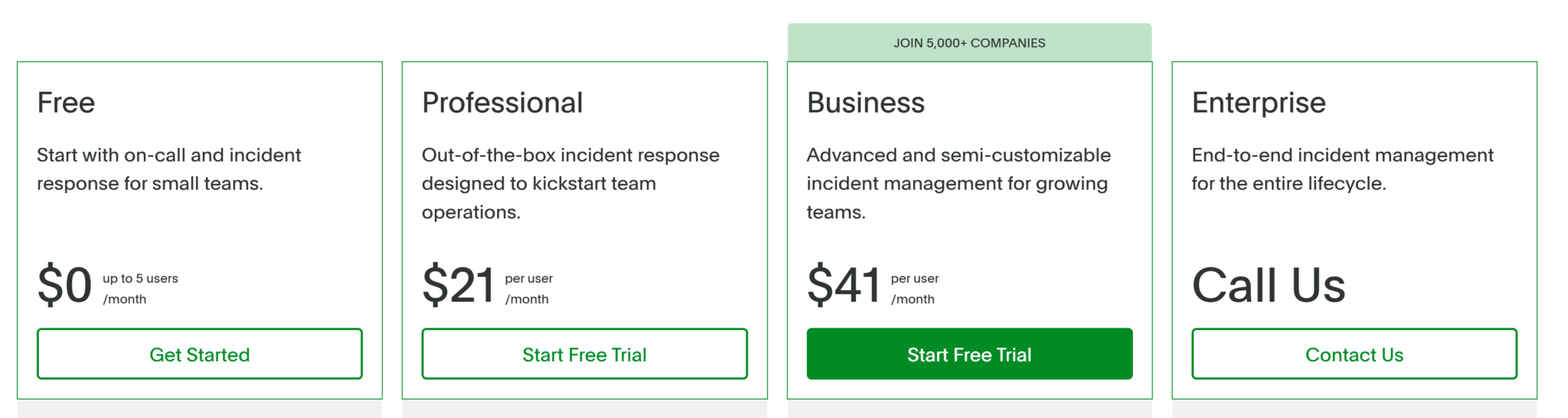
PagerDuty has four pricing plans: Free, Professional ($21 per user/month), Business ($41 per user/month), and Enterprise (custom pricing, contact their team). For IT teams evaluating xMatters alternatives for enterprise IT, PagerDuty’s Business and Enterprise tiers are the most relevant options, though costs scale quickly across larger teams.
Splunk On-Call

Source: Splunk
Splunk automates key processes to reduce time taken to acknowledge and resolve incidents. With Splunk, incidents can be delivered to the right person based on their expertise. The tool also allows to streamline on-call schedules and escalation policies.
Splunk On-Call Features
- Splunk on-call uses machine learning to recommend responders and identify similar incidents, helping teams have the right people and information to remediate incidents.
- The Rule Engine adds further context to incidents by adding resources such as runbook, articles and dashboard, to accelerate incident resolution.
Splunk On-Call Cons
- Lack of Product Focus
On-call management isn’t a core priority for Splunk, and the platform has seen minimal innovation since its acquisition. - Slow or Impersonal Support
Users have reported that support requests can get lost or delayed within Splunk’s large organizational structure, making it hard to get quick, tailored assistance.
Pricing
Source: Splunk
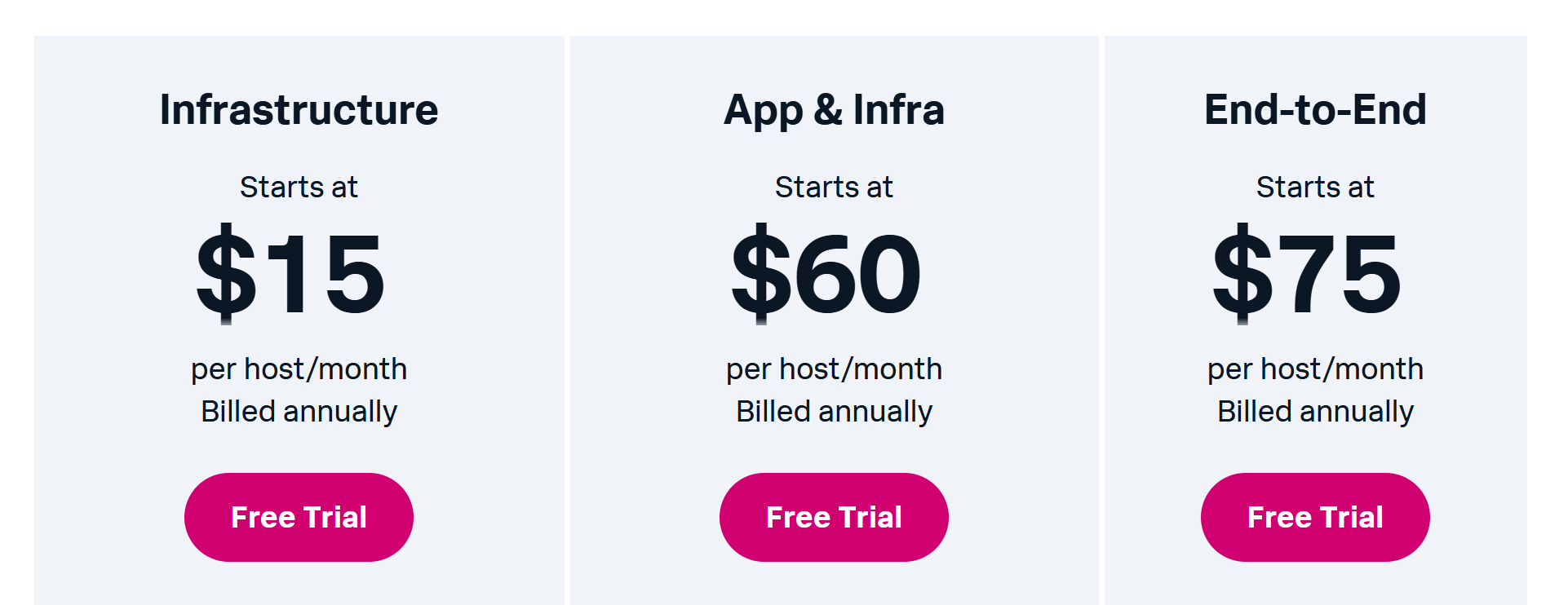
Splunk On-Call has three pricing plans, with no free option. The first is their Infrastructure plan starting at $15 per host/month. Then they have App & Infra which is $60 per host/month. Splunk’s most expensive subscription is $75 per host/month.
Opsgenie

Source: G2
Opsgenie is an incident management platform designed to ensure critical alerts are never missed. It enables teams to schedule on-call rotations, manage escalations, and quickly respond to incidents by notifying the right people at the right time. Opsgenie integrates with a variety of monitoring and collaboration tools, helping teams maintain high availability and reliability of their systems.
Opsgenie Features
- Customizable alerting rules, escalations and on-call schedules to ensure the right people are notified
- Detailed timeline to track incident activities and responses
- Post-event reports to help teams improve processes
- On-call scheduling to manage duties and rotations
- API and webhooks to support custom integration
Opsgenie Cons
- Integration Issues with Observability Tools
Some users have reported on Reddit that they face challenges when connecting Opsgenie to modern observability platforms, which can hinder effective incident management. - Outdated User Experience
The platform has been described as having an archaic feel, which may affect usability and team satisfaction. - Cumbersome Holiday Overrides
Making schedule adjustments for holidays or shift exceptions requires multiple steps and offers little guidance, which slows down teams managing time-sensitive on-call coverage. - Fragile On-Call Rotations
Adding new team members to the rotation can disrupt existing configurations, creating coverage gaps that put incident response at risk.
Pricing
Source: Opsgenie
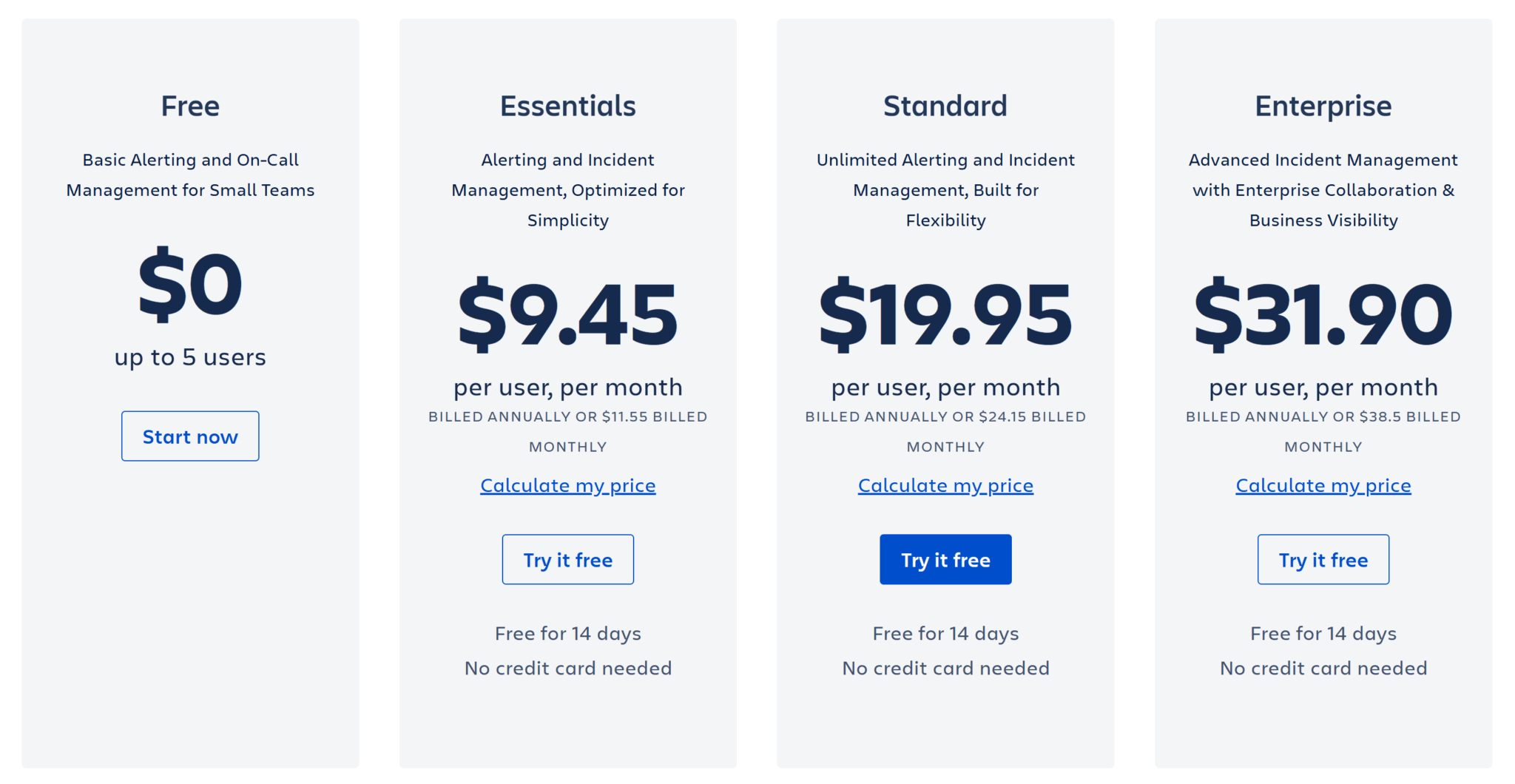
Opsgenie has four pricing packages – Free, Essentials, Standard and Enterprise. Essentials is $9.45 per user/month and is a simple plan with limited features. Standard offers unlimited alerting and incident management for $19.95 per user/month. Lastly, Enterprise is the advanced plan costing $31.90 per user/month.
Datadog Incident Management

Source: Datadog
Datadog Incident Management helps DevOps teams and SREs manage incident response workflows from detection through resolution. Users can automatically detect, triage, and resolve incidents directly in the Datadog app while consulting monitoring data from across the platform.
With Datadog, users can declare, manage and investigate incidents from multiple sources without losing any information during context switching. Teams can move from alert to chat room to timeline without losing context. The slack app integration presents additional collaboration opportunities for teams.
Datadog Incident Management Features
- Declare incidents directly from a graph, monitor, security signal or from the incidents page.
- Single pane for tracking all active incidents.
- Correlated logs, metrics and traces to identify root causes.
- Integration with Slack to collaborate with key responders.
Datadog Incident Management Cons
- Limited Track Record
Launched in August 2020, the platform has only a few years of real-world use, which means less community feedback, fewer proven integrations, and a shorter track record than more established on-call solutions. - Basic Paging Capabilities
Publicly available information suggests the paging features are still rudimentary and not as robust as competitors. - Perceived Overpricing
A common theme in user feedback is that Datadog’s tools are expensive relative to the value provided—a concern likely to extend to its on-call product.
Pricing

Source: Datadog
For Datadog Incident Management alone, the price is $30 per seat/month, and if you wanted to bundle the product with Datadog on-call, the pricing is $40 per seat/month.
Open-Source Alternatives to xMatters
For teams with the technical resources to self-host and maintain internal infrastructure, open-source incident alerting tools can be a flexible and cost-effective alternative to commercial platforms like xMatters. These solutions offer the core functionality needed for on-call management and alert delivery, often without licensing fees or vendor lock-in. However, open-source tools require significantly more hands-on effort to configure, maintain, and secure. They typically lack formal support, polished mobile experiences, and out-of-the-box compliance (including HIPAA), which can be critical in high-stakes environments like healthcare or enterprise IT.
Here are four open-source alternatives worth considering:
Iris by LinkedIn
Developed at LinkedIn, Iris is a scalable incident communication system designed for high-priority alerting. It routes alerts intelligently to the right responders and integrates seamlessly with OnCall, making it well-suited for large-scale engineering organizations.
OnCall by LinkedIn
OnCall complements Iris by handling complex on-call schedules, rotations, and escalations. With native Slack and email integrations, it gives teams control over how and when alerts are delivered, making it a viable xMatters alternative for enterprise IT teams that want to manage their full incident lifecycle in-house.
OpenDuty
OpenDuty is a lightweight, open-source alerting platform modeled after PagerDuty. It handles basic on-call rotations and escalation rules, and delivers alerts via services like Twilio and SMTP. Best for smaller teams that want basic incident alerting without the complexity or cost of enterprise tools.
Cabot
Cabot is a self-hosted, open-source monitoring and alerting system with built-in health checks and integrations with external monitoring tools. It manages both detection and alerting, offering a unified experience for teams that want an all-in-one, open-source alternative.
Try OnPage for FREE! Request an enterprise free trial.
Wrap Up
We’ve demonstrated the value of adding incident response tools to one’s tech stack in order to keep their digital estate running smoothly. While xMatters has strong features, several xMatters alternatives for enterprise IT teams are worth evaluating, each suited to different workflows and environments. Each platform has strengths in specific use cases, so the right choice depends on your team’s workflows, compliance needs, and alerting requirements. If you’re ready to see how OnPage compares, Try OnPage for Free!

About The Author


