G2 - High Performer - Summer 2025 G2 - Fastest Implementation - Summer 2025 G2 - Best ROI - Summer 2025 TrustRadius - Top Rated Capterra Shortlist GetApp Category Leaders Software Advice Front Runners G2 - Momentum Leader - Summer 2025 G2 - Users Love Us

The Crisis: 15 Minutes is the Standard. Why is it so hard to hit?

In a busy Emergency Room, the real enemy isn’t a lack of staff: it’s missed handoffs, silent queues, and unclear ownership. When a patient registers, “someone” should see them. But when surges happen or staffing gaps peak, “someone” often becomes “no one”.

OnPage transforms your 15-minute triage goal from a “best effort” into an enforced, automated workflow.

Yoast Focus Keyword

How it Works: From Registration to Triage in <15 Minutes

OnPage integrates directly with your EHR/ADT feed (e.g., ADT^A04) to turn data into immediate clinical action. Using our high-flexibility API, we connect with any EHR, including Epic, Cerner, and Meditech, to fit your specific hospital workflow.

Clinical Precision: Mapping to ESI Levels

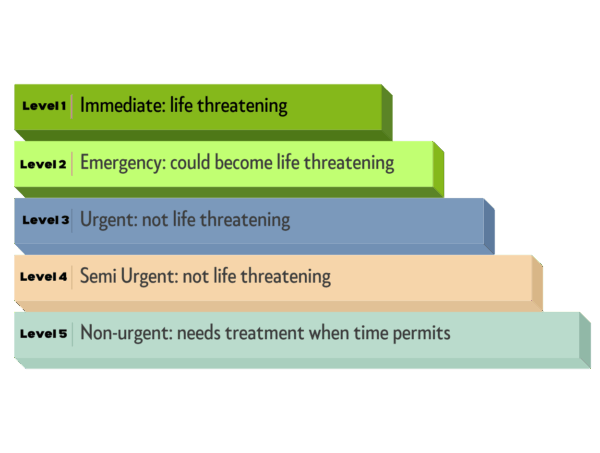
OnPage doesn’t just notify; it prioritizes based on the Emergency Severity Index (ESI) to ensure the most critical patients are seen instantly.“OnPage doesn’t decide the ESI level, it guarantees the right clinician sees the patient fast enough to decide it.”

  • ESI-1 (Immediate): Immediate OnPage alert to Triage, Charge Nurse, and MD.

  • ESI-2 (≤10 min): Priority OnPage alert with rapid escalation.

  • ESI-3 (≤15 min): Standard triage workflow with enforced 15-minute SLA.

  • ESI-4/5 (Policy-based): Logged and queued for visibility without distracting from high-acuity needs.

Yoast Focus Keyword

Why This Works: Hardwired Accountability

  • ERs are interrupt-driven: Humans fail silently under load; OnPage enforces time and accountability, not just notification.

  • Real-Time Visibility: Our dashboard shows Charge Nurses patients approaching a breach, enabling proactive intervention.

  • Reporting & Compliance: Automatically produce audit logs of triage times and escalation frequency for regulatory defense.

Yoast Focus Keyword

The Economics of Clinical Accountability: Quantifying Your ROI

Delayed triage isn’t just a safety risk; it’s a massive financial drain. By hardwiring the 15-Minute Triage Guarantee, OnPage recovers lost capacity and captures leaked revenue.

How Much Is Your “Silent Queue” Costing You?

We’ve benchmarked our impact across three primary hospital profiles using verified industry data from the CDC, HFMA, and the Emergency Nurses Association.

Yoast Focus Keyword

Download Now! 🡻

Name(Required)

Further Reading on Triage Workflow Optimization

Explore additional OnPage resources to better understand different hospital triage workflows, best practices,
and how secure messaging and critical alerting platforms are transforming healthcare collaboration across the globe.

Start Your Journey to Critical Alerting in Just Minutes

    • What is triage in the emergency room?

      Triage is the clinical process of prioritizing patients based on the severity of their condition rather than their order of arrival. In the emergency room, triage ensures that patients with life-threatening issues—such as a stroke or cardiac arrest—receive immediate care, while stable patients are queued. Most hospitals use the Emergency Severity Index (ESI) to categorize patients from Level 1 (Immediate) to Level 5 (Non-Urgent).

      OnPage Insight: Effective triage requires a “15-minute guarantee” from registration to clinical contact to ensure patient safety.

    • Is triage the same as the emergency room?

      No. While the terms are often used interchangeably, “Triage” is a specific workflow that happens inside the Emergency Room (ER) or Emergency Departemnt (ED).

      Triage is the “gateway” of the ER; it is the critical point where a patient is assessed and routed to either the Trauma Bay, a standard exam room, or the waiting area.

      OnPage Insight: The gap between the ER waiting room and the Triage desk is where most “silent failures” occur. OnPage automates the notification process to bridge this gap.

    • How do you triage in the emergency room?

      Triage begins the moment a patient registers. A Triage Nurse performs a rapid assessment of vital signs, chief complaints, and physical appearance. Based on these findings, the nurse assigns a priority level (ESI).

      • High Acuity: Immediate routing to a physician.

      • Low Acuity: Routing to the waiting area or “Fast Track” for minor injuries. The goal of the triage process is to initiate this assessment within 15 minutes of the patient’s arrival.

    • What are the triage procedures in the emergency room?

      Standard triage procedures involve four primary steps:

      1. Initial Collection: Gathering patient ID and the “Chief Complaint.”

      2. Assessment: Checking vitals (heart rate, BP, O2 saturation) and pain levels.

      3. Categorization: Assigning an ESI level (1 through 5).

      4. Disposition: Routing the patient to the appropriate clinical area.

      OnPage Insight: Modern triage procedures now include automated clinical alerts. When a patient is registered, OnPage sends an instant, audible notification to the triage team to ensure the 15-minute SLA is never breached.

    • What is the emergency room triage nurse job description?

      An ER Triage Nurse is a highly experienced Registered Nurse (RN) responsible for the rapid assesment and prioritization of all incoming patients. Their primary duties include:

      • Performing quick, accurate physical and mental health assesments
      • Determinig the acuity of patients and assigning ESI levels.
      • Managing the flow of the waiting area to prevent overcrowding
      • Communicating critical patient data to the Charge Nurse and MDs. The role requires exceptional critical thinking, as the Triage Nurse must identify “hidden” emergencies, like a stable-looking patient who is actually experiencing an early-stage MI.

OnPage