


Managing a growing IT environment requires more than reacting to problems as they appear. IT teams and managed service providers (MSPs) need continuous visibility into endpoints, servers, networks and other infrastructure so they can identify potential issues, perform maintenance and resolve problems remotely.
That is where remote monitoring and management (RMM) software comes in.
RMM tools provide IT teams with a centralized way to monitor and manage distributed IT environments. Modern RMM platforms commonly combine remote monitoring with capabilities such as patch management, automation, remote access, alerting and reporting.
But with many RMM solutions available, finding the right platform depends on the size and complexity of your environment, existing technology stack, automation requirements and operational workflows.
Below, we explore 10 RMM tools IT teams and MSPs can consider in 2026, along with another important component of an effective monitoring strategy: ensuring that critical RMM alerts actually reach the right responder.
What Is RMM Software?
Remote monitoring and management (RMM) software allows IT professionals to remotely monitor, manage and maintain endpoints, networks and other IT infrastructure from a centralized platform.
Rather than waiting for users to report problems, RMM tools can continuously monitor system health and generate alerts when predefined conditions are met. Depending on the platform, IT teams can also remotely access devices, deploy patches, execute scripts and automate repetitive maintenance or remediation tasks.
RMM software is especially common among MSPs managing multiple customer environments, but it can also support internal IT departments responsible for distributed offices, remote employees or large endpoint environments.
What Should You Look for in an RMM Tool?
The right RMM platform will depend on your organization’s IT environment and operational requirements. However, several capabilities are worth considering when comparing solutions:
- Remote monitoring: Visibility into endpoint, server, network and system health.
- Remote access: The ability to troubleshoot and manage devices without being physically present.
- Patch management: Automated deployment and management of operating system and third-party application updates.
- IT automation: Scripts and workflows that reduce repetitive manual work.
- Alerting: Notifications when system conditions or performance thresholds require attention.
- Reporting and analytics: Visibility into assets, performance, incidents and maintenance activity.
- Integrations: Connections with PSA, ITSM, security, backup, alerting and other IT operations tools.
- Scalability: The ability to manage a growing number of endpoints, customers or locations.
With those capabilities in mind, here are 10 RMM platforms to consider.
10 RMM Tools to Consider in 2026
1. NinjaOne
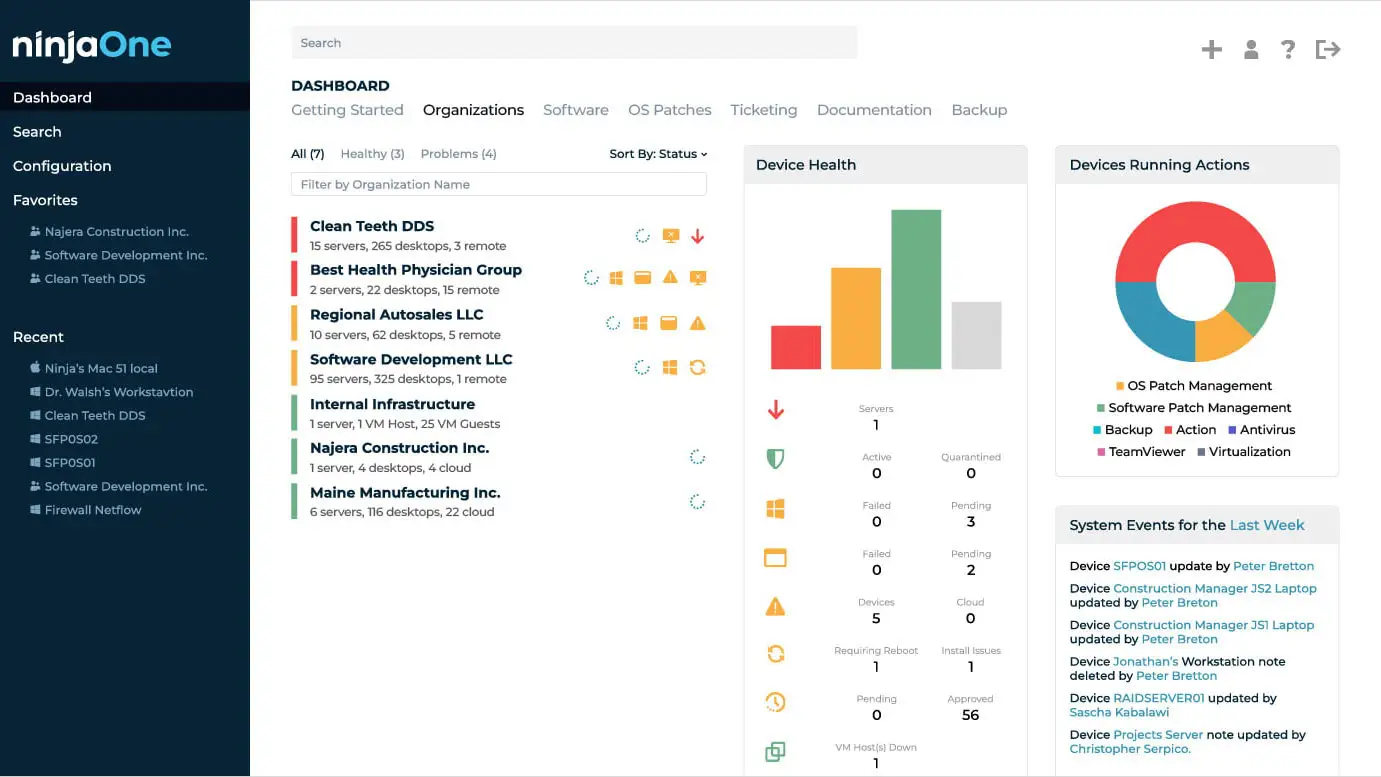
NinjaOne provides cloud-based endpoint management and RMM capabilities for MSPs and internal IT organizations. Its platform focuses on centralized endpoint visibility and management while providing tools for automation, patching and remote support.
NinjaOne’s RMM offering supports proactive endpoint management and is designed to help technicians manage distributed IT environments from a central interface. Current industry comparisons regularly include NinjaOne among widely evaluated RMM platforms.
Standout Features
- Condition-based auto-remediation for issues such as stopped services, missed reboots, open ports, and missing applications.
- Multi-device remote scripting using PowerShell, Batch, and Shell.
- Native IT documentation for storing processes, credentials, and device relationships alongside endpoint management.
- End-user self-service portal for functions such as file restores, remote access, and ticket management.
- Mobile endpoint management that lets technicians view device information and remediate issues while away from their workstation.
Who Should Consider NinjaOne?
NinjaOne may be worth evaluating for MSPs and internal IT teams looking to centralize endpoint monitoring, maintenance and remote management within a cloud-based platform.
2. ConnectWise RMM
ConnectWise RMM is a remote monitoring and management platform designed to help MSPs monitor endpoints and automate IT management activities.
RMM is part of the broader ConnectWise ecosystem, making the platform particularly relevant to organizations that want monitoring capabilities connected with other service delivery and IT operations workflows.
ConnectWise describes modern RMM as providing centralized visibility into remote endpoints and networks while using automation and alerts to support proactive IT management.

Standout Features
- Live automated network topology mapping that provides an interactive, continuously updated view of client networks.
- Automated alert remediation that can consolidate related issues and initiate predefined remediation tasks.
- Custom monitoring tied to PSA workflows, including automated ticket creation rules.
- AI-assisted monitor creation through ConnectWise Sidekick for RMM.
- Optional ConnectWise NOC services for organizations that want to outsource 24/7/365 monitoring of critical servers.
Who Should Consider ConnectWise RMM?
ConnectWise RMM may be a consideration for MSPs looking for remote monitoring capabilities that can work alongside a broader set of ConnectWise service management tools.
3. Datto RMM
Datto RMM, part of Kaseya, is a cloud-based remote monitoring and management platform built primarily for MSPs.
The platform gives technicians centralized visibility into managed devices and provides tools for monitoring, patching, automation and remote support. Current RMM comparisons frequently position Datto RMM as an option for MSPs, particularly those using other products within the Datto and Kaseya ecosystem.

Standout Features
- MSP-focused multi-tenant RMM designed for managing multiple customer environments.
- Policy-driven automation for standardizing endpoint management across client environments.
- Integration with the broader Kaseya/Datto ecosystem, including security, backup, and IT operations products.
- Centralized asset visibility across hardware, software, virtual machines, cloud infrastructure, and other managed assets.
Who Should Consider Datto RMM?
Datto RMM may fit MSPs looking to centralize endpoint management and automate routine IT maintenance, particularly organizations already using other Datto or Kaseya products.
4. N-able N-central
N-able N-central combines RMM and endpoint management capabilities for MSPs and IT organizations managing complex environments.
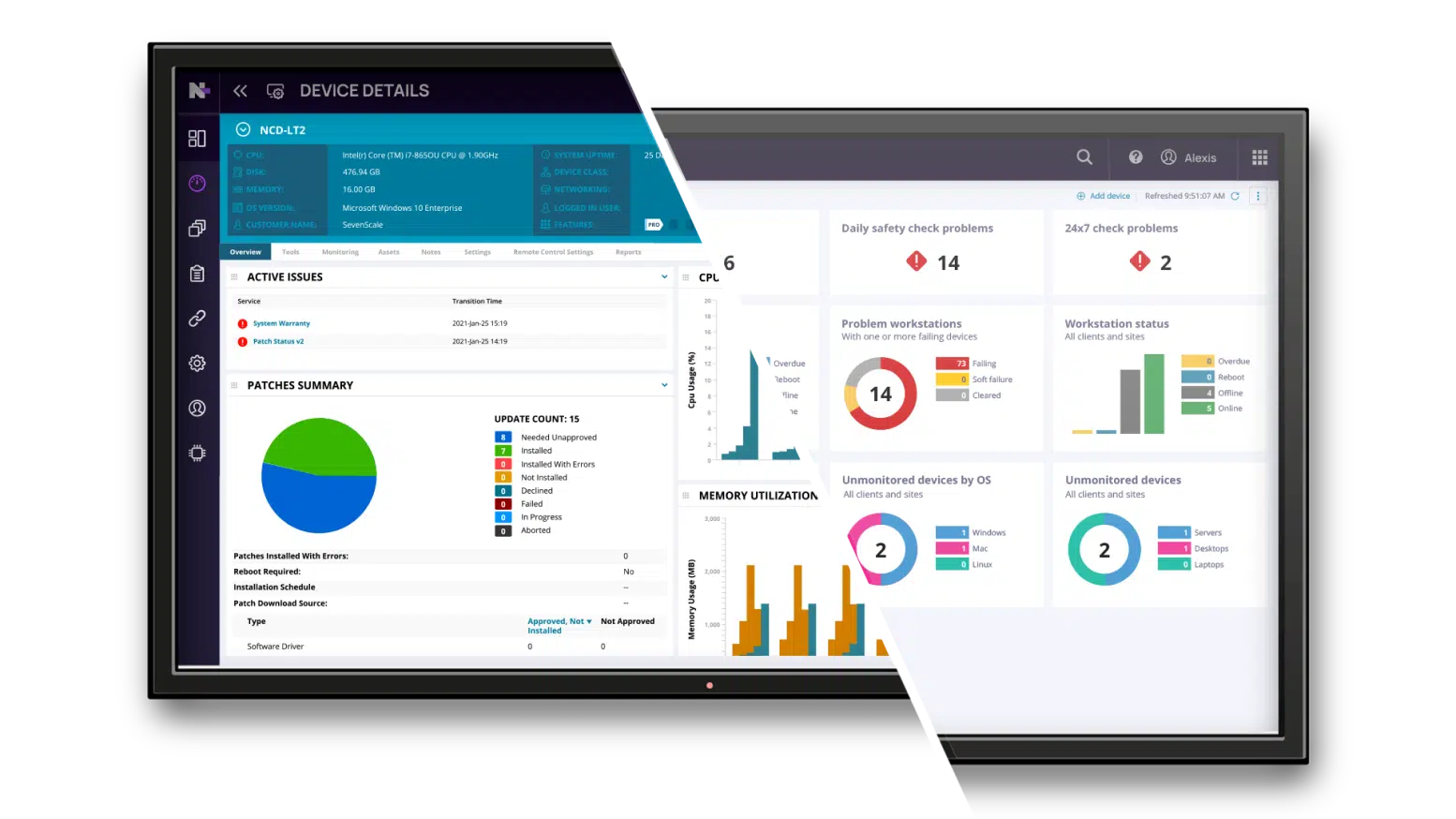
N-central supports Windows, macOS and Linux endpoints as well as network and cloud-connected assets. Its capabilities include endpoint monitoring, remote access, patch management, network device monitoring, automation, reporting and security-related functionality.
The platform also provides a rules engine and automation capabilities that organizations can use to apply monitoring policies and trigger remediation workflows across managed endpoints.
Standout Features
- Embedded Microsoft Power BI reporting with prebuilt and customizable analytics dashboards.
- 700+ prebuilt automation scripts plus custom scripting and generative-AI assistance.
- Drag-and-drop automation manager for building workflows without requiring extensive scripting knowledge.
- Network monitoring for Cisco, Fortinet, HP, Juniper, SonicWall, and other network devices, including SSH and custom MIB monitoring.
- Cloud Commander integration for multi-tenant Microsoft 365, Azure, and Intune management.
- AI-assisted vulnerability management for identifying, prioritizing, patching, and verifying remediation.
Who Should Consider N-central?
N-central may be useful for MSPs and IT providers managing large or complex environments that require granular monitoring, automation and endpoint management capabilities.
5. Atera
Atera provides RMM capabilities alongside additional IT management functionality for MSPs and IT departments.
The platform combines monitoring with functions such as remote access, patch management, automation and ticketing. Atera also differentiates its approach through technician-based pricing rather than relying exclusively on per-endpoint licensing.

Standout Features
- AI Copilot that works with device, ticket, and alert context and can run health checks and assist with remediation.
- Robin autonomous IT agent designed to resolve certain end-user IT issues through self-service.
- Network Discovery powered by Nmap to identify and catalog connected devices and surface network information.
- Integrated RMM and help desk/ticketing capabilities within the same platform.
- Technician-based pricing model, rather than charging solely according to the number of managed endpoints.
Who Should Consider Atera?
Atera may appeal to smaller and midsized IT teams or MSPs that want RMM and service management capabilities within the same platform and prefer a technician-oriented pricing structure.
6. Kaseya VSA
Kaseya VSA provides remote monitoring and endpoint management capabilities for IT teams and MSPs.
The platform is designed to give administrators visibility and control over distributed devices while supporting automation and remote management. VSA is also part of Kaseya’s broader IT management ecosystem, which can make it relevant to organizations already using Kaseya products.
Standout Features
- Automation Hub combining scripts, scheduled tasks, workflows, and managed files.
- Graphical RPA-style workflows with conditional logic for automating multi-step IT processes.
- PowerShell and Bash scripting across Windows, macOS, and Linux.
- Granular patch review rules for automatically approving or rejecting OS updates.
- Policy-based patch management with maintenance windows, reboot scheduling, update controls, and patch overrides.
- Native integrations across the wider Kaseya ecosystem for security, backup, compliance, and other IT operations workflows
Who Should Consider Kaseya VSA?
Kaseya VSA may be worth considering for MSPs and IT departments seeking RMM functionality within the broader Kaseya technology ecosystem.
7. Syncro
Syncro combines RMM and professional services automation (PSA) capabilities into a platform designed primarily for MSPs.
Rather than maintaining completely separate systems for device management and service operations, MSPs can use Syncro for remote monitoring while also handling areas such as ticketing, billing and automation.
Industry comparisons describe Syncro as particularly relevant to smaller and midsized MSPs looking for combined RMM and PSA functionality.
Standout Features
- RMM and PSA in one platform, reducing the need to maintain separate systems.
- Integrated ticketing connected with device and customer information.
- Built-in billing and invoicing for MSP service operations.
- Custom scripting and automated remediation for managed endpoints.
- MSP-oriented workflows connecting endpoint events with service delivery processes.
Who Should Consider Syncro?
Syncro may be suitable for MSPs looking to combine technical RMM functions with service delivery and business management workflows.
8. Pulseway
Pulseway is an RMM platform with a strong focus on enabling technicians to monitor and manage IT systems remotely, including through mobile devices.
The platform supports remote monitoring, automation, patching and remote management, giving technicians the ability to respond to IT conditions even when they are away from their primary workstation. Current RMM comparisons frequently distinguish Pulseway for its mobile-oriented approach to IT management.

Standout Features
- Mobile-first IT administration, allowing technicians to monitor infrastructure from smartphones and tablets.
- Remote actions from mobile devices, allowing technicians to respond without returning to a workstation.
- Workflow automation for responding to recurring IT conditions.
- Integrated endpoint management and patching accessible across distributed environments.
Who Should Consider Pulseway?
Pulseway may be useful for smaller IT teams and MSPs that value the ability to monitor and manage systems from mobile devices.
9. SuperOps
SuperOps provides RMM and PSA capabilities for MSPs and IT teams within a unified IT management platform.
Its RMM capabilities cover endpoint monitoring and management while its PSA functionality supports broader service operations. The platform has also incorporated AI-assisted capabilities into its approach to IT management and service delivery.

Standout Features
- Monica AI for generating Windows, macOS, and Linux scripts from natural-language instructions.
- AI-powered intelligent alerting designed to identify anomalies and group or reduce redundant alerts.
- Automatic remediation that can resolve endpoint issues before they turn into support tickets.
- Unified RMM + PSA architecture connecting devices, tickets, patches, service delivery, and other MSP workflows.
- AI-assisted patching that provides additional context around patching decisions.
- Cross-platform management spanning Windows, macOS, Linux, iOS/iPadOS, Android, and network devices.
Who Should Consider SuperOps?
SuperOps may be worth evaluating for MSPs that want RMM and PSA functionality within a modern, consolidated platform.
10. ManageEngine Endpoint Central
ManageEngine Endpoint Central provides unified endpoint management capabilities that overlap with many of the functions organizations typically seek from RMM platforms.
The platform is frequently included in RMM comparisons because it supports centralized endpoint management, remote access, patching and IT administration across distributed environments.

Standout Features
- Unified endpoint management across Windows, macOS, Linux, iOS, Android, and ChromeOS.
- OS imaging and deployment, including hardware-independent deployment and user-profile migration.
- Patch management covering 1,000+ third-party applications, alongside OS patching.
- Mobile device management (MDM) for managing smartphones and tablets alongside traditional endpoints.
- Enterprise browser management and security, including browser add-on restrictions, download controls, safe browsing, and isolation.
- 75+ templated automations and a repository of 300+ custom scripts for endpoint administration.
Who Should Consider ManageEngine Endpoint Central?
Endpoint Central may be a consideration for internal IT departments and larger organizations looking to centrally manage a broad collection of endpoints and related IT operations.
RMM Tools at a Glance
| RMM Tool | Remote Monitoring | Remote Access | Patch Management | IT Automation | Reporting & Analytics | Integrations |
|---|---|---|---|---|---|---|
| NinjaOne | Centralized endpoint and device monitoring | Built-in remote support | Automated OS and third-party patching | Policy-based automation and scripting | Device, patch and performance reporting | Broad ITSM and security integrations |
| ConnectWise RMM | MSP-focused infrastructure monitoring | Remote troubleshooting and support | Automated patch deployment | Advanced scripting and workflows | Operational and technician reporting | Deep ConnectWise ecosystem integration |
| Datto RMM | Cloud-based, MSP-focused monitoring | Remote device access | Automated endpoint patching | Policy-based automation and scripting | MSP-oriented device and performance reporting | Strong Datto/Kaseya ecosystem |
| N-able N-central | Granular endpoint, server and network monitoring | Remote troubleshooting and control | OS and third-party patching | Advanced scripting and automated remediation | Detailed performance and asset reporting | PSA, security and backup integrations |
| Atera | Centralized endpoint and system monitoring | Integrated remote support | Automated patch management | Automation profiles and scripting | Device, ticket and operations reporting | IT and business-tool integrations |
| Kaseya VSA | Broad endpoint and infrastructure monitoring | Remote endpoint management | Automated patch deployment | Extensive policy-based automation | Operational and endpoint reporting | Strong Kaseya ecosystem |
| Syncro | MSP-focused endpoint monitoring | Built-in remote management | Automated patch management | Scripting and automated remediation | Device, ticketing and business reporting | MSP and business integrations |
| Pulseway | Real-time, mobile-focused monitoring | Desktop and mobile remote management | OS and third-party patching | Workflow automation and scripting | System health and performance reporting | PSA, security and IT integrations |
| SuperOps | Cloud-based endpoint and asset monitoring | Unified remote management | Automated patching | AI-assisted automation | Unified RMM and PSA analytics | MSP and IT platform integrations |
| ManageEngine Endpoint Central | Endpoint monitoring with a UEM focus | Remote desktop and troubleshooting | Extensive OS and third-party patching | Endpoint and software deployment automation | Device, software and compliance reporting | ITSM and security integrations |
RMM Monitoring Is Only One Part of Incident Response
RMM platforms give IT teams visibility into their environments. They can identify system failures, performance problems and other conditions that require attention.
But detecting an issue does not automatically mean the appropriate person will respond to it.
Consider an RMM platform that identifies a critical server issue outside normal business hours. The monitoring platform has done its job by detecting the problem and generating an alert. The next challenge is ensuring that alert reaches the person who is actually responsible for responding at that time.
This creates an important distinction between monitoring infrastructure and mobilizing incident responders.
That is where a critical alerting and on-call management platform can complement an RMM system.
How OnPage Complements RMM Tools
OnPage is not an RMM platform. Instead, OnPage’s critical alerting and on-call management platform can work alongside RMM and monitoring systems to help ensure high-priority alerts reach the appropriate responder.
RMM systems are designed to monitor IT environments and detect problems. OnPage provides an additional alerting and escalation layer that helps IT organizations mobilize the people responsible for addressing those problems.
OnPage can receive alerts from monitoring tools, ITSM platforms, RMM systems, email and other sources and route them to designated on-call responders. If the initial responder is unavailable, alerts can be rerouted according to on-call schedules and escalation policies.
The workflow can look like this:
RMM detects an issue → Critical alert is sent to OnPage → OnPage identifies the on-call responder → High-priority alert is delivered → Responder acknowledges the alert → Incident response begins
OnPage + N-central RMM
One example of this approach is the OnPage integration with N-able N-central.
N-central provides the RMM functionality needed to monitor and manage IT infrastructure. When N-central detects a critical condition, its integration with OnPage can route the alert to the on-call team so responders receive a high-priority mobile notification.
This helps bridge the gap between system monitoring and human response.
OnPage Capabilities for RMM Alert Management
On-Call Scheduling
Organizations can establish on-call schedules and rotations so critical alerts are automatically routed to the responder responsible at the time of the incident.
Automated Escalation
If an alert is not addressed by the initial responder, OnPage can use predefined escalation policies to route the notification to another person or team.
High-Priority Mobile Alerting
Critical events can be delivered as prominent mobile alerts, helping organizations distinguish incidents that require immediate attention from routine notifications.
Alert Deduplication
During high-volume incidents, repeated notifications about the same underlying condition can overwhelm responders. Alert deduplication can help consolidate matching alerts and make critical incident communication easier to manage.
Multichannel Notification Redundancy
Organizations can use additional notification channels such as SMS, voice and email as redundancy for critical alerts, helping expand the ways responders can be reached.
Audit Trails and Reporting
OnPage provides visibility into alert delivery and acknowledgment activity, helping teams understand how critical notifications moved through the response process.
RMM vs. OnPage: What’s the Difference?
RMM and OnPage address different stages of IT operations and incident response.
| Capability | RMM Platform | OnPage |
|---|---|---|
| Monitor endpoints and infrastructure | Yes | No |
| Patch and maintain endpoints | Yes | No |
| Remotely access devices | Yes | No |
| Detect system conditions | Yes | No |
| Manage on-call schedules | Varies | Yes |
| Route alerts based on who’s on call | Varies | Yes |
| Escalate unacknowledged critical alerts | Varies | Yes |
| High-priority mobile alerting | Varies | Yes |
| Alert acknowledgment visibility | Varies | Yes |
Rather than replacing an RMM platform, OnPage can serve as an incident alerting and on-call management layer for organizations that need to make sure important RMM events reach the appropriate human responder.
How to Choose an RMM Tool
There is no single RMM platform that fits every IT organization. Before selecting a solution, consider how the platform will fit into your existing technology stack and operational processes.
Ask questions such as:
What needs to be monitored?
Consider the number and types of endpoints, servers, operating systems, network devices and other assets your team manages.
How much do you want to automate?
If your organization manages hundreds or thousands of endpoints, scripting and workflow automation can significantly affect technician workload.
What systems does the RMM need to integrate with?
Evaluate compatibility with your PSA, ITSM, security, backup, alerting and other operational tools.
How are critical alerts handled?
Monitoring is only useful when actionable events reach someone who can respond. Determine how alerts are prioritized, routed and escalated—particularly outside normal business hours.
How will the platform scale?
Consider how pricing, administration and performance will change as your organization adds endpoints, technicians, customers or locations.
Frequently Asked Questions About RMM Tools
What does RMM stand for?
RMM stands for remote monitoring and management. RMM software allows IT professionals and MSPs to remotely monitor, maintain and manage IT endpoints, networks and other systems from a centralized platform.
What does an RMM tool do?
RMM tools typically monitor the health and performance of managed IT assets while providing capabilities such as remote access, patch management, automation, alerting and reporting. Modern RMM systems help IT teams proactively identify and address issues rather than relying exclusively on users to report problems.
Who uses RMM software?
RMM platforms are commonly used by managed service providers (MSPs) and internal IT departments responsible for managing distributed endpoints and infrastructure.
What features should an RMM tool have?
Common RMM capabilities include remote monitoring, endpoint management, patch management, remote access, automation, scripting, alerts, reporting and integrations with other IT operations systems.
The specific features an organization needs will depend on its environment and operational requirements.
Can RMM tools integrate with alerting platforms?
Yes. RMM systems can integrate with external alerting and incident management platforms to extend how critical events are routed and managed.
For example, OnPage integrates with N-central so critical RMM events can be delivered to on-call responders through OnPage.
How can IT teams improve RMM alert management?
Organizations can start by determining which RMM events genuinely require immediate human intervention and separating them from informational or low-priority notifications.
For high-priority events, integrating an RMM system with an on-call alerting platform can provide additional capabilities such as schedule-based routing, escalation and acknowledgment tracking.
About The Author


